
Attendance
in seconds.
One record for the
whole institution.
Faculty start a session with a live QR code. Students check in through the mobile app, and attendance flows into one institutional record, ready for review, reporting and timely action.
- Karthik Reddy9:02:00
- Sneha Robert9:01:53
- Aditya Raman9:01:46
- Priya Nair9:01:39
- Rohan Mehta9:01:32
- Ananya Krishnan9:01:25
| Course | Held | Attended | Standing |
|---|---|---|---|
| Data Structures | 42 h | 39 h | Eligible |
| Design Thinking | 30 h | 21 h | Borderline |
| Operating Systems | 36 h | 34 h | Eligible |
| Discrete Mathematics | 40 h | 38 h | Eligible |
Taken in secondsThe room fillsOne institutional record
Attendance gets recorded. The real work starts later.
Registers, separate spreadsheets and forwarded lists leave the institution piecing attendance together at the end of the semester, when it is too late to help a student.
Start the session. Students scan. Attendance is recorded.
Start the session.
The faculty member picks the class and shows a live QR code on the classroom screen, with the list of who is present beside it.
Students check in.
Each student scans with the TrackMyClass app on their own registered phone and confirms. Their name appears on the classroom screen straight away.
Attendance is recorded.
When the session closes, the record is updated and each student's standing in the course reflects it.
Built for real classrooms. A faculty member can handle the exceptions a real class produces, and every correction stays on record with who made it and when.
The report is ready before anyone asks for it.
Every scan lands in the same record, connected to the course, the student and the faculty member. Open any course or any student the moment someone asks. Nobody chases files or reconciles versions at the end of the semester.
Every course in one view
Class, faculty, student count and average attendance for each course, across the institution.
Every student's history
Open a course for every student's standing, or a student for their full day-by-day record.
A record of every change
Corrections are logged with who made them and when, so the record stays traceable.
| Course | Class | Faculty | Students | Avg. attendance |
|---|---|---|---|---|
| Data Structures CS2103 | B.Tech CSE · Sec A | Dr. A. Raman | 58 | 84% |
| Operating Systems CS2105 | B.Tech CSE · Sec A | Prof. L. Rao | 58 | 79% |
| Discrete Mathematics MA2101 | B.Tech CSE · Sec B | Dr. S. Menon | 57 | 88% |
| Design Thinking HS2102 | B.Tech CSE · Sec B | Dr. P. Nair | 57 | 71% |
| Database Systems CS2201 | B.Tech CSE · Sec A | Dr. K. Reddy | 60 | 82% |
When the exam cell or the university needs a file, any report can be exported to Excel.
Attendance should be known on the day it is taken, by everyone it concerns.
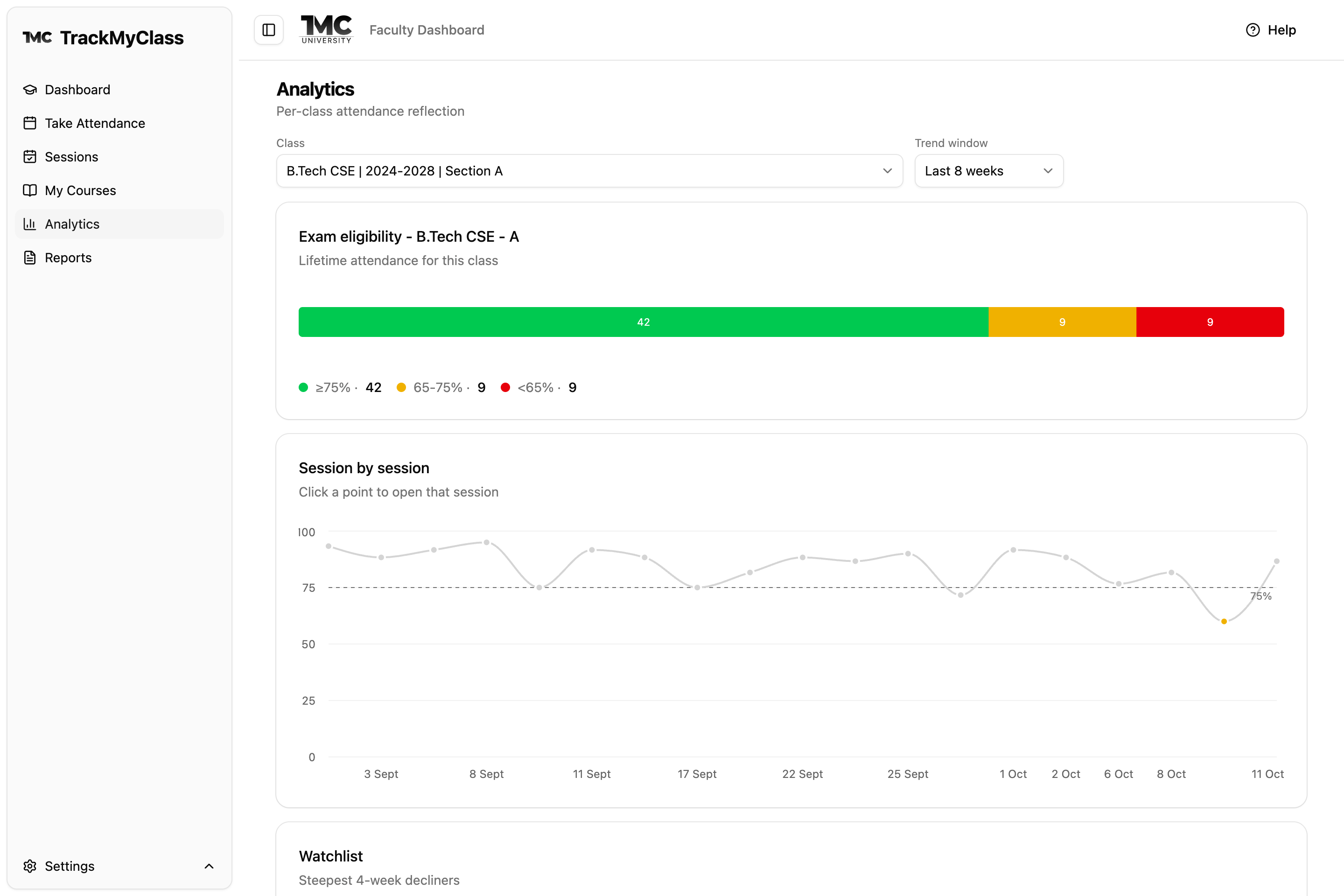
Identify attendance risks before they become exam problems.
Every percentage is shown against the exam-eligibility line as eligible, borderline or ineligible. Faculty see their classes ranked by how they are doing. Students see exactly how many classes they must attend to get back above the line.
Borderline means below the line, with time left to recover. Standing is counted in hours of class, so a longer class counts for more.
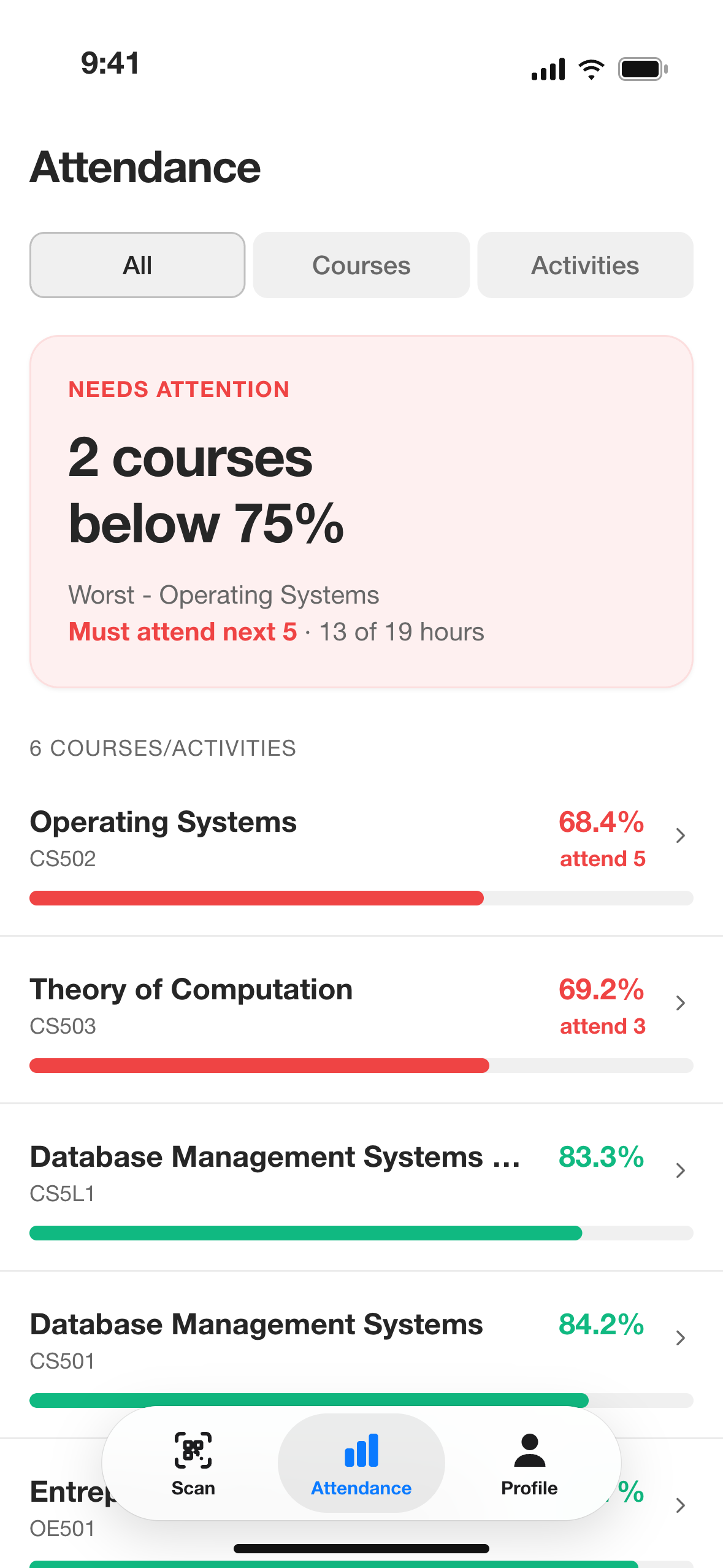
“Attend the next 3 classes to get back above the line.”
A plain answer, course by course, with day-by-day history. The courses needing attention come first.
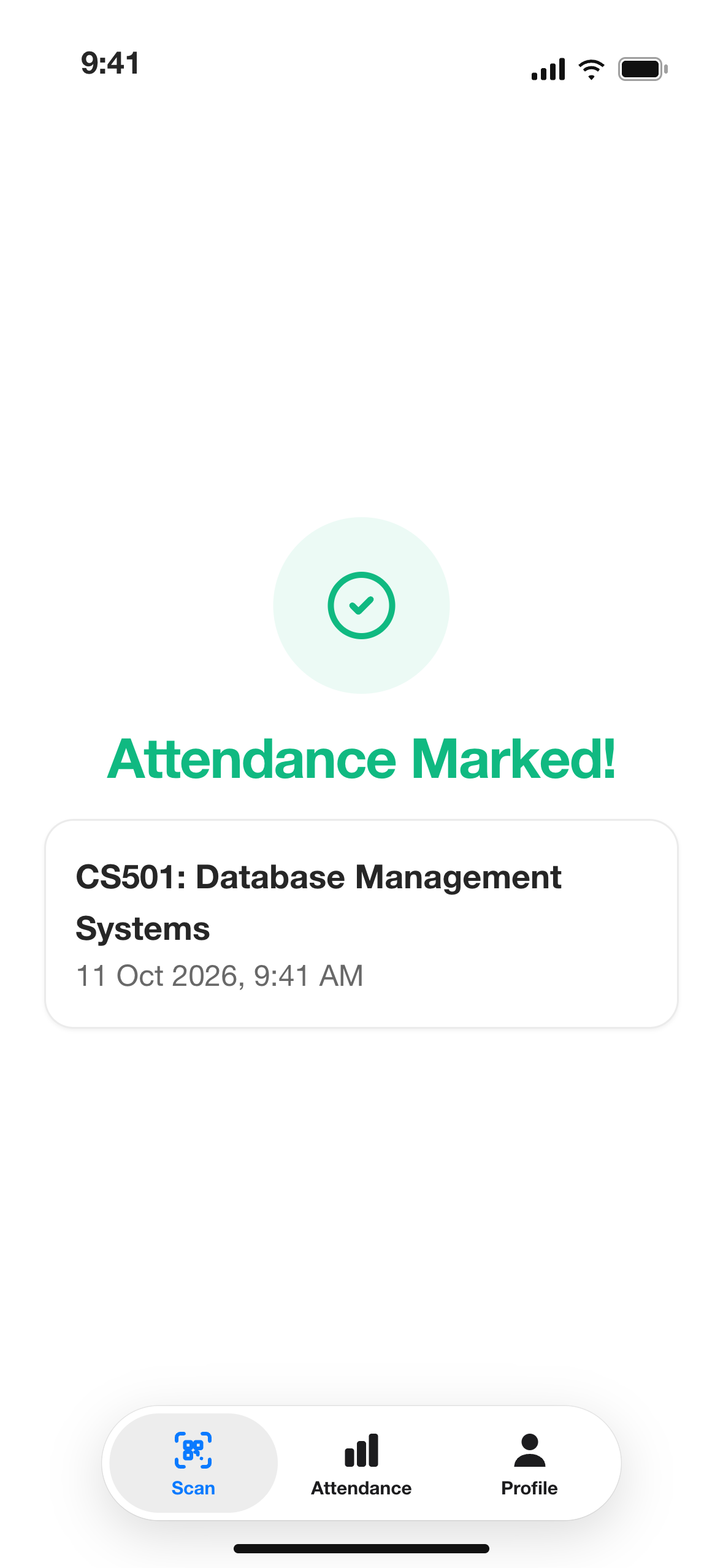
Attendance the institution can stand behind.
Several verification measures work together to discourage proxy attendance and keep classroom records credible. A check-in that does not pass them is not recorded, and the student is told so.
Built for the whole institution.
Administrators, faculty, students and parents work from the same record, each seeing what their role allows.
Administrators
Set up the institution as it already runs: departments, programmes, sections, electives, faculty and students. Review attendance for every course the day it is taken, and export reports when they are needed.
Faculty
Take attendance in the class. See which classes and which students need attention, correct a record when needed, and have the history to hand when a student asks.
Students
Scan, confirm, done. Every course at a glance, the ones needing attention first, with a plain answer to how many classes to attend to get back above the line.
Parents
Parents added by the institution sign in to the same app and see the same course-by-course attendance for each of their children. They open the app to check whenever they like.
For students and parents, on their phone.
One app for Android and iPhone. Scan, confirm, done.
One platform. Beyond the classroom.
From student activities to campus events, the same attendance record works beyond the regular timetable.
Clubs and student activities
Attendance for clubs, NSS, YRC and development programmes, kept apart from exam eligibility.
Events and workshops
Record who came to guest lectures, workshops and other institutional events.
Field activities and online sessions
Attendance beyond the classroom, where the institution allows it.
One platform for your institution’s wider attendance needs.
Academic structures, timetables, announcements and exports sit alongside attendance on the same platform.
Frequently asked questions
Can a student send a photo of the QR code to a friend?
No. A forwarded photo of the code is not enough on its own. Several verification measures work together, and a check-in is recorded only when it meets the requirements of that session. Together they make proxy attendance impractical.
Can we use our existing student and course records?
Yes. Bring the files you already keep. Departments, programmes, sections, electives, faculty, students and parents are all set up from them.
Does it integrate with our ERP or other systems?
Not at present. Every report exports to Excel, which most systems can import. Tell us at the demo what you need to connect.
What if a student's phone is dead, or they cannot scan?
The faculty member can mark them present. Like every correction, it is kept on record with who made it and when.
Can attendance be corrected later?
Yes, by the faculty member or an administrator. Every correction is kept on record with who made it and when, so the record stays traceable.
Does it need internet?
Yes. Students and faculty need a connection while attendance is taken. Staff use a web browser; students and parents use the app.
Which phones work?
Android phones and iPhones with a camera, location and fingerprint or face unlock set up.
Can parents see attendance?
Yes. Parents added by the institution sign in to the same mobile app and see their own child's attendance, course by course.
Does TrackMyClass store fingerprints or faces?
No. Confirmation uses the phone's own fingerprint or face unlock. TrackMyClass does not collect or store biometric data.
See it in action at your institution.
A walkthrough of classroom attendance, course-wise reporting and student standing, starting with the spreadsheets you already use. See how it fits the way your institution already works.
For colleges, universities and academic institutions.